

What Is the AR Zone App? Everything You Need to Know
AR Zone is Samsung’s official built-in augmented reality platform, pre-installed on supported Galaxy smartphones and tablets. It works directly through your device camera — no downloads or third-party apps required.
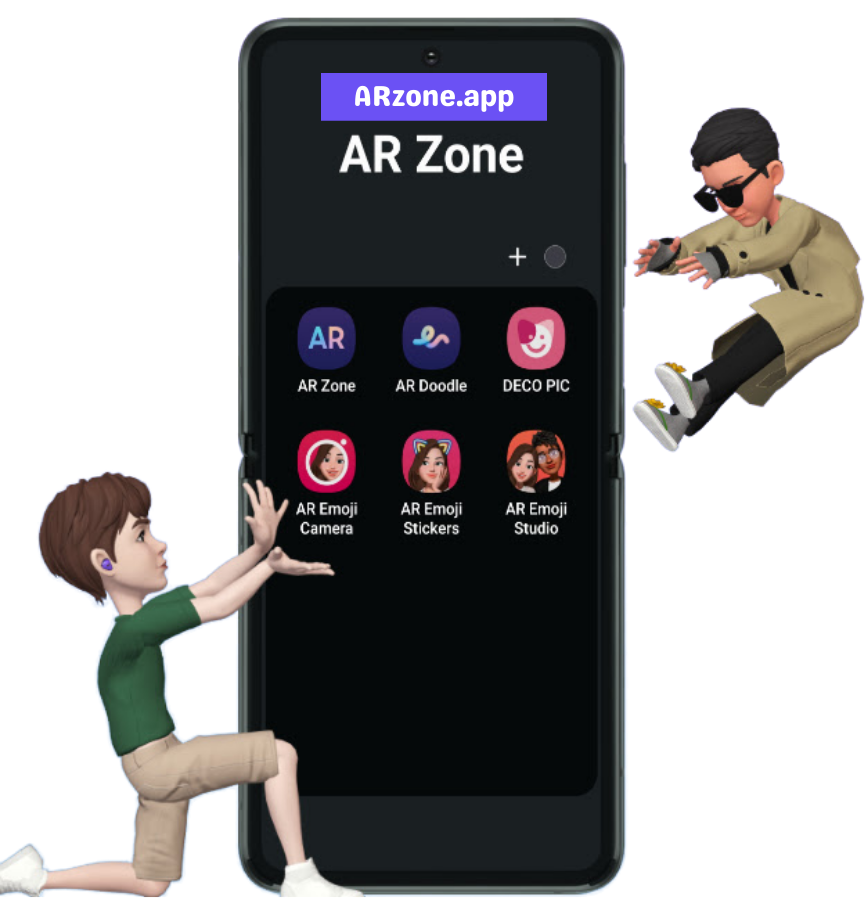
AR Zone allows you to create personalised AR emojis that reflect your facial emotions, draw animated doodles in real time with AR Doodle, apply stickers and effects with Deco Pic, and measure real-world things with Quick Measure.
Available on most Samsung Galaxy devices running Android 10 or later with One UI, AR Zone is designed to be safe, lightweight, and fully integrated into the native camera experience. This tutorial will tell you all you need to know about it, including what it does, which phones support it, and how to delete it.
100+
Samsung Galaxy models supported
6
Samsung Galaxy models supported built-in AR tools
Free
Samsung Galaxy models supported pre-installed, no cost or sign-up
Safe
developed by Samsung, follows Android security standards
What Does the AR Zone App Actually Do?
AR Zone app gives your Samsung camera 6 powerful augmented reality tools — from animated personal avatars to real-world measurement. Unlike third-party filter apps, AR Zone is incorporated right into your device, resulting in faster performance, tighter camera integration, and no privacy concerns from other apps. Here’s what each tool does and when to utilise it.
Key AR Zone App Features:
AR Emoji
Using the front camera, you may create a 3D animated avatar based on your face. Your avatar imitates real-time facial expressions and head motions and can be used in chats, social media posts, and video clips. You can change your skin tone, hair, clothing, and accessories.
- Best for: messaging apps, Instagram stories, personalised stickers

AR Doodle
Allows you to draw, write, and animate straight on the live camera view. Unlike other drawing apps, AR Doodle anchors your doodles to real-world objects, allowing them to move and remain in position as you move the camera. It works in both front and back camera modes.
- Best for: creative video content, Reels, YouTube Shorts

Deco Pic
Adds augmented reality stickers, animated frames, and seasonal effects to your photos and videos in real time. Effects respond to movement and depth, making them look naturally placed in the scene rather than flat overlays.
- Best for: fun selfies, festive photos, social media stories

Quick Measure
It uses your device’s camera and augmented reality technologies to measure the length, width, and height of real-world items. Point the camera at any surface, tap to set measurement points, and receive an instant readout. Accuracy is determined by lighting and surface clarity.
- Best for: measuring furniture, room dimensions, packages

AR Emoji Camera
A dedicated camera mode that replaces your real face with your AR avatar in live video. The avatar tracks your head movement, expressions, and even blinking in real time. Useful for video calls, recorded clips, or content where you prefer avatar-based identity.
- Best for: video calls, TikTok, anonymous content creation

AR Emoji Stickers
Creates a comprehensive sticker collection from your AR Emoji avatar, including expressions such as joyful, astonished, laughing, and waving. Stickers sync with your Samsung keyboard and are compatible with WhatsApp, Telegram, Messages, and most other chat apps.
- Best for: WhatsApp, Telegram, Samsung keyboard
How to Open and Use AR Zone on Samsung?
1. Open your Samsung Camera app
Swipe to "More" in the camera mode selector at the bottom of the screen.
2. Tap "AR Zone"
You'll see the AR Zone hub with all available tools listed — AR Emoji, AR Doodle, Deco Pic, etc.
3. Select the tool you want to use
Each tool opens a dedicated interface. AR Emoji will prompt you to create your avatar on first use.
4. Can't find AR Zone in camera?
Go to Settings → Apps → AR Zone and check if it's enabled. On some models, it may need a One UI system update.
Can You Delete or Disable AR Zone?
AR Zone is a system-level application on most Samsung Galaxy devices, hence it cannot be completely deleted as a typical downloaded app can. However, you have two alternatives for managing it:
- Option 1 — Disable it: Go to Settings → Apps → AR Zone → Disable. This stops the app from running and removes it from your app drawer without deleting system files.
- Option 2 — To remove AR Zone from the camera’s “More” modes, press Edit in the camera mode option and toggle it off. AR Zone remains on the device but stays out of the way.
- Important: Disabling AR Zone will not harm your phone. It will not affect call quality, camera performance, or any other Samsung features.
Step-by-step: How to disable AR Zone
1. Open Settings on your Samsung phone
Swipe down from the top and tap the gear icon, or find Settings in your app drawer.
2. Go to Apps (or Application Manager)
Scroll down to find the full list of installed and system apps.
3. Search for "AR Zone"
If you are unable to find it when scrolling, use the search icon at the top. Make sure the "Show system apps" option is activated.
4. Tap Disable
If you see "Uninstall updates" first, tap that — then Disable will appear. Confirm when prompted.
5. Done — AR Zone is now hidden
It will no longer be visible in your app drawer or camera modes. You can re-enable it at any moment from the same settings menu.
Is the AR Zone App Safe to Use?
Yes, the AR Zone app is completely safe to use. It is developed and maintained by Samsung Electronics and is pre-installed as part of the One UI system software on supported Galaxy devices. As a native system application, AR Zone adheres to Samsung’s security standards as well as Google’s Android platform rules, which regulate all system-level apps on Android.
AR Zone requests access to your camera, microphone, and storage — but only to deliver augmented reality features. These permissions are only used within the app and are not shared with third-party advertising or data brokers. AR Zone does not run in the background while you are not using it.
What AR Zone CAN access
- Camera — displays AR effects through the lens in real time
- Microphone — captures audio when you record AR videos
- Storage — saves photos and videos you create with AR Zone
These are the only permissions AR Zone requires. Nothing else.
What AR Zone CANNOT do
- It cannot access your contacts, messages, or location
- It does not run background processes or track usage
- It does not send data to advertisers or third parties
- It cannot be used to spy on you — it only activates when you open it
AR Zone App Download & Availability
The AR Zone app download is available on supported Samsung Galaxy phones as part of the system software and can be accessed directly through the device camera or app menu. On compatible devices, the Samsung AR Zone app may be pre-installed or available through official Samsung distribution channels.
Availability of the AR Zone app on Android depends on device model, Android version, and regional support. To ensure safety and good performance, the AR Zone app should only be accessed or updated from reliable and official sources.
Availability for supported Samsung devices
View Samsung device compatibility
Learn about Android availability
Which Samsung Phones Support AR Zone?
AR Zone is compatible with most Samsung Galaxy devices running Android 10 or later and Samsung One UI 2.1 or above. However, not all AR Zone features are available on all supported models; Quick Measure and full AR Emoji are only available on devices equipped with the requisite camera hardware. If AR Zone is missing from your phone, it may need a software update, or your model may not include full support. Check your model in the table below.
| Series | Models | AR Zone | AR Emoji | Quick Measure |
|---|---|---|---|---|
| Flagship | Galaxy S24, S24+, S24 Ultra | Yes | Yes | Yes |
| Flagship | Galaxy S23, S23+, S23 Ultra | Yes | Yes | Yes |
| Flagship | Galaxy S22, S21, S20 series | Yes | Yes | Partial |
| Fold / Flip | Galaxy Z Fold 5, Z Flip 5 | Yes | Yes | Yes |
| Fold / Flip | Galaxy Z Fold 4, Z Flip 4 | Yes | Yes | Partial |
| Mid-range | Galaxy A55, A54, A35, A34 | Yes | Yes | No |
| Mid-range | Galaxy A53, A52, A33, A32 | Partial | Partial | No |
| Budget | Galaxy A15, A14, A13 | Partial | No | No |
| Budget | Galaxy A03, A02 series | No | No | No |
Do You Need the AR Zone App?
Whether you need the AR Zone app depends on how you use your phone’s camera and creative features. AR Zone is intended for consumers that prefer interactive, camera-based augmented reality experiences embedded right into their device.
You may want the AR Zone app if you:
- Create AR emojis or animated avatars for texting and social sharing
- Use camera effects, stickers, and AR visuals in photos or videos
- Enjoy creative tools such as AR Doodle for real-time painting and animation
- Quick Measure allows you to measure items or distances on supported devices
- Prefer built-in Samsung features over third-party AR or filter apps
- Want to access augmented reality technologies connected with the system camera
You may not need the AR Zone app if you:
- Do not use AR camera features
- Prefer basic photography without visual effects
- Want a standard app experience with fewer system tools
Check Requirements:
AR Zone App – Frequently Asked Questions
Find clear answers to the most common questions about the AR Zone app, including how it works on Samsung and Android devices, whether it is safe to use, if you need it on your phone, and how availability or removal options work.
What is the AR Zone app?
The AR Zone app is a built-in augmented reality application for Samsung Galaxy phones that adds interactive AR elements to the device’s camera.
What is the AR Zone app used for?
The AR Zone app allows you to create AR emojis, add augmented reality effects to photographs and videos, draw in real time with the camera, and use AR-based measurement tools.
What does the AR Zone app do on Samsung phones?
On Samsung phones, the Samsung AR Zone app integrates directly with the camera to provide AR visuals, creative effects, and interactive tools without third-party apps.
Is AR Zone an Android app or a Samsung app?
AR Zone is a Samsung-developed app that runs on Android. While it runs on the Android platform, it is specifically built for Samsung devices.
Is the AR Zone app safe to use?
Yes. The AR Zone app is safe since it was designed by Samsung and adheres to Android security and privacy standards. Camera permissions are only needed to activate AR features.
Do I need the AR Zone app on my phone?
You only need the AR Zone app if you want to use the augmented reality camera features. If you do not use AR tools, the app may remain inactive or hidden.
Why is the AR Zone app on my phone?
The AR Zone app appears on many Samsung phones because it comes pre-installed as part of the system software on supported models.
Can I uninstall or delete the AR Zone app?
If you want to uninstall AR Zone app, which is a system program on most Samsung phones, cannot be completely deleted. It can, however, be hidden or adjusted in the device’s settings.
How do I remove or disable the AR Zone app?
While AR Zone cannot be completely deleted, users can control permissions, hide the app from the app drawer, and disable related functions in the Settings menu.
Where can I download the AR Zone app?
The AR Zone app download is available on supported Samsung devices through official system updates or Samsung app distribution channels.
Does the AR Zone app work on all Android phones?
No. The AR Zone app on Android works only on compatible Samsung devices. Availability and features vary by model and Android version.
What are the main features of the AR Zone app?
AR Emoji, AR Doodle, Deco Pic, Quick Measure, and other camera-integrated AR tools are among the key features available for supported devices.
Get Started With the AR Zone App
The AR Zone app brings camera-based augmented reality features directly to supported Samsung devices. Explore availability, compatibility, and official access options to start using AR Zone with confidence.

Alex Turner
Android & Samsung Technology Writer
This guide was written and reviewed by Alex Turner, an independent Android technology writer with over 6 years of experience covering Samsung devices, One UI features, and mobile AR applications. Content on this page is based on hands-on testing with Samsung Galaxy devices and official Samsung documentation.